
Investment apps serve users with different goals, experience levels and behaviours, but often offer the same interface and journey to everyone.
One user checks a long-term portfolio. Another follows market movements and compares assets. A third regularly trades or adjusts a strategy. The same investor may combine all these goals.
A strong investment app should not force every investor through the same journey. It should help users reach the tools and information that match their current goal.
This is the role of investment app personalization. It can shape the starting screen, information depth, asset organisation, alerts and key actions.
In the State of Digital Investment in Europe study, Markswebb analysed 20 investment apps across onboarding, asset discovery, trading, portfolio analytics, automation and account management.
The results show that leading services adapt different parts of the investment app UX to support different investor goals.
Contents
Different investors need different levels of depth
Investor needs depend on more than experience. They also vary by investment horizon, trading frequency, instruments used, risk tolerance, decision-making style and demand for analytics.
Beginners need clear explanations and predictable steps. Long-term investors focus on portfolio performance, asset allocation, regular contributions and automation. Active investors need market data, watchlists, price alerts, advanced order types and fast access to trading.
The same user may have several investment goals
These needs do not always belong to separate user segments. One investor may hold a long-term portfolio, monitor selected companies, fund an investment plan and make occasional short-term trades.
The digital investment experience should therefore reflect both the user’s broader profile and their current intent.
Why this matters for the product
Investment app personalization can help users reach key actions faster, reduce cognitive load and make relevant tools easier to find. It also allows one product to support several investment strategies and changing levels of experience.
Personalization does not require complex recommendation algorithms. It can be built through interface settings, sorting options, alerts, configurable start screens and investment automation.
An adaptive investment experience follows five principles.
1. Adapt the entry point to the user’s task
Users should quickly reach the section that matches their recurring goal, whether it is the portfolio, markets, search or watchlists.
2. Adjust the depth of information
Some users need a short explanation, while others want more detail. The interface should support both without overloading the main journey.
3. Let users define what deserves attention
Users should be able to choose which assets, metrics and market events they want to monitor.
4. Support different levels of investor independence
One product can support self-directed trading, automated investment plans and more guided strategies.
5. Adapt throughout the investor journey
Personalization should extend beyond onboarding and the first purchase. It should also support market monitoring, portfolio analysis, order management, strategy changes and account operations.
The following examples come from services that ranked among the top five for speculative investing in the State of Digital Investment in Europe study:
SaxoInvestor, Revolut, IBKR Mobile and Trading 212 also ranked in the top five for long-term investing. This shows that one product can support both long-term portfolio management and more active investment scenarios.
The examples below focus on how different market leaders solve specific personalization tasks across the investor journey.
Practice 1. SaxoInvestor: Letting Users Choose Their Starting Point
SaxoInvestor lets users choose which section opens when they launch the app:
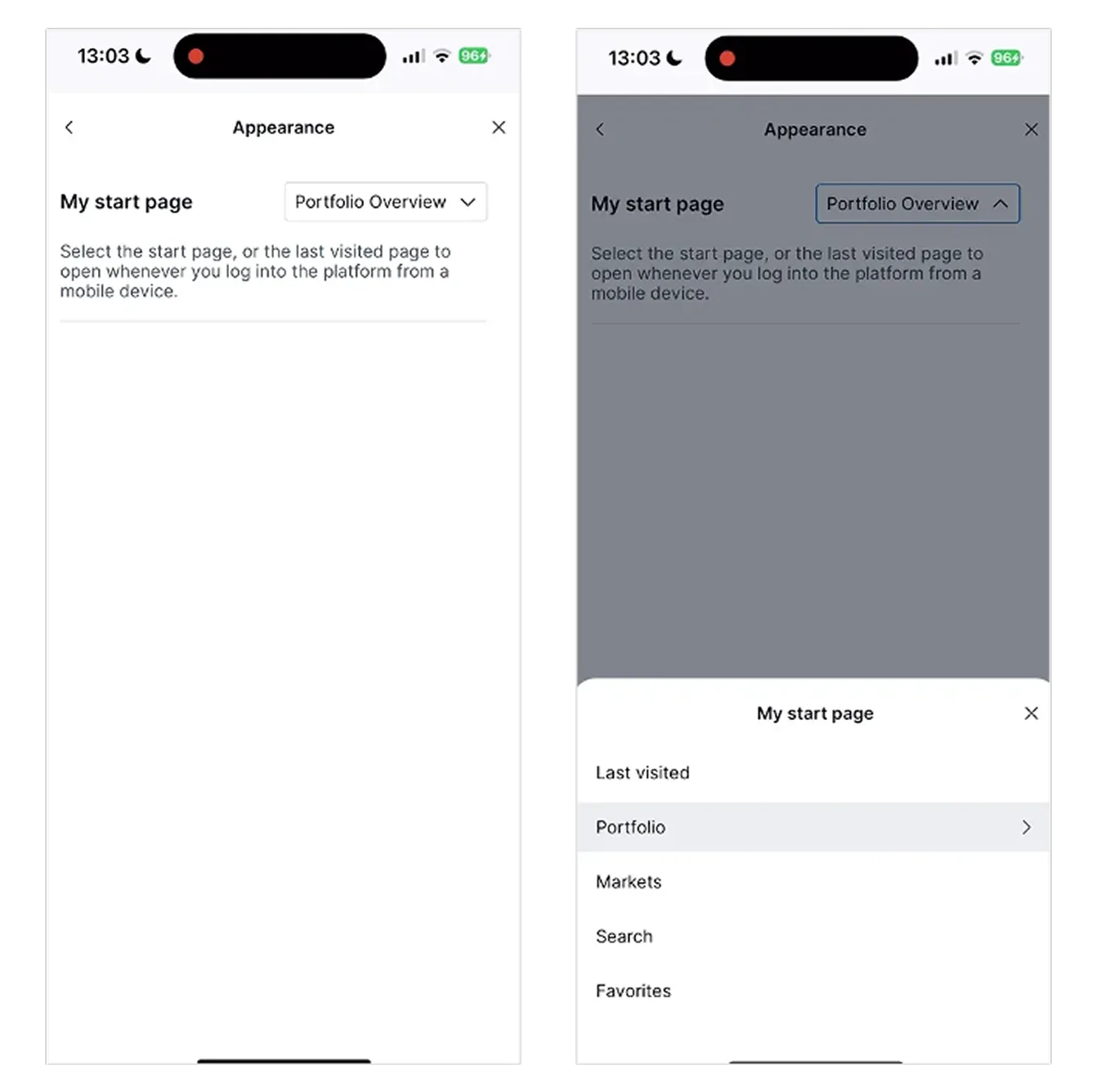
A long-term investor can open the portfolio immediately, while a more active user can start with markets, search or selected assets. This reduces repeated navigation and lets users define their main scenario themselves.
The setting is visible, reversible and based on explicit user choice rather than an attempt to predict intent automatically.
Product takeaway: effective personalization can be as simple as giving users control over where their journey begins.
Practice 2. Revolut: Providing Different Levels of Explanation
Revolut uses two levels of explanation for market, limit and stop orders.
Short descriptions on the selection screen help users understand the basic differences without interrupting the journey. Those who need more detail can open information about execution conditions and order duration.
This supports beginners at the point of decision while keeping the main interface compact for experienced investors.
Product takeaway: layered content can serve different experience levels without creating separate interfaces for beginners and professionals.
Practice 3. IBKR Mobile: Giving Advanced Investors Deeper Portfolio Analytics
IBKR Mobile provides one of the most detailed portfolio analysis experiences among the apps studied.
Users can review:
These tools help users interpret portfolio performance, connect individual transactions with their broader strategy and make decisions without relying on external services.
Product takeaway: supporting advanced investors does not require making every screen more complex. Greater depth should appear where users need to analyse results.
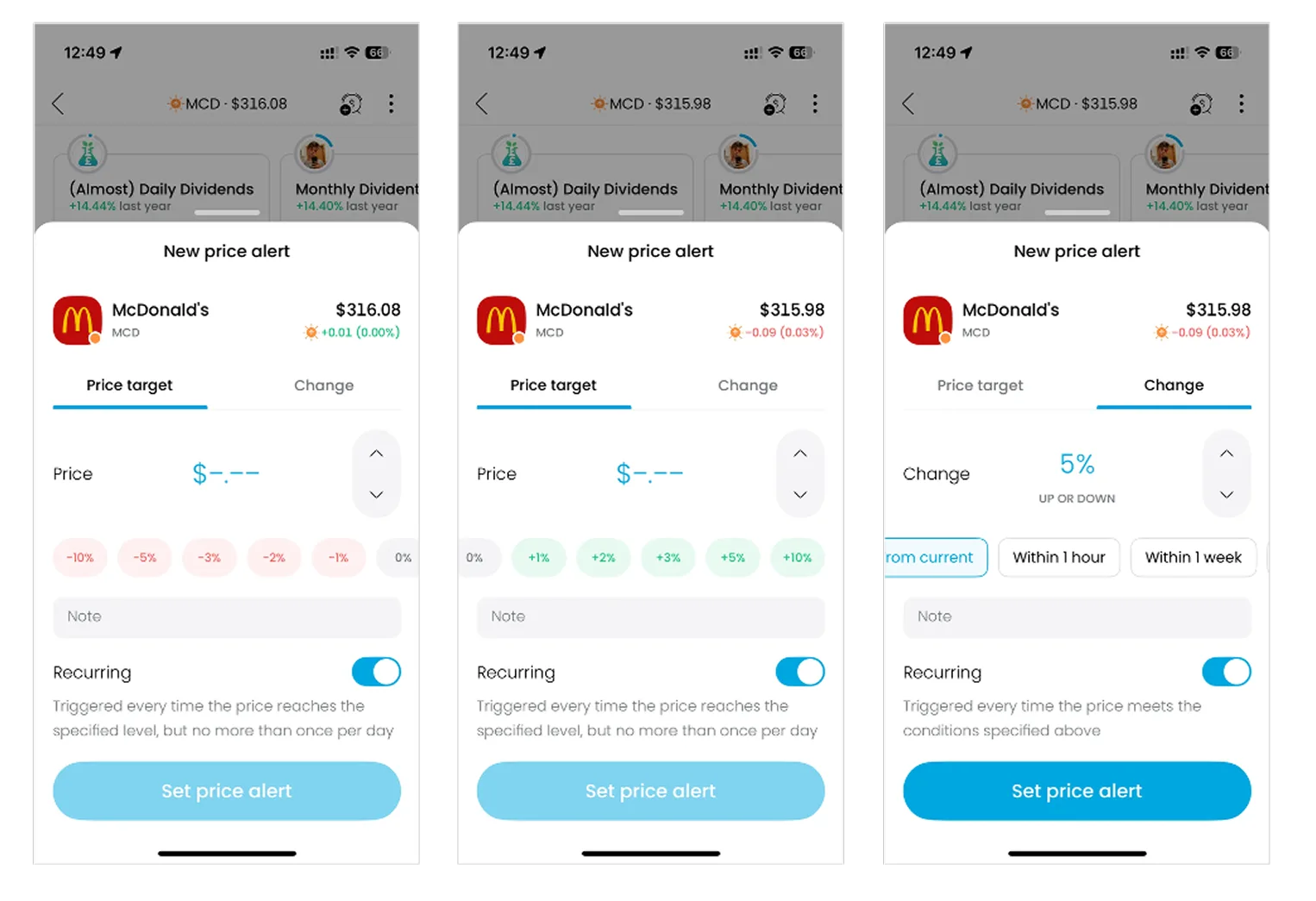
Practice 4. Trading 212: Turning Alerts into a Personal Monitoring Tool
Trading 212 allows users to configure asset price alerts by:
The same tool can support different strategies. An active trader may monitor short-term movements, while a long-term investor may set an alert for a strategically important price level.
This reduces the need to check the app constantly and limits irrelevant notifications.
Product takeaway: alerts become a personalization tool when users control their conditions, frequency and context.
Trading 212 also supports long-term goals through Pies. Users can combine stocks and ETFs into a personal investment plan, define asset weights and set contribution frequency and investment horizon.
Practice 5. Freedom24: Supporting the User’s Existing Trading Strategy
Freedom24 lets users recreate an expired order while keeping its original parameters:
Instead of finding the asset again and re-entering the details, the user can open the expired order and repeat it in one action.
This reduces repeated steps and input errors while using previous activity as the starting point for the next action.
Product takeaway: personalization can reflect not only the user profile, but also the context of previous actions.
Freedom24 also provides a single section for MiFID test statuses. It shows which instruments are currently available and what the user needs to do to access more complex assets. This allows the interface to reflect the investor’s current eligibility and level of experience.
The practices of the top five investment apps show that personalization is most useful when it responds to what the user is trying to do now.
Adapt to intent, not only to user segments
Age, experience and portfolio size do not fully explain the user’s current need. The same investor may check portfolio performance in the morning, study the market later, set a price alert, fund an investment plan or repeat a trade.
Product teams should therefore design around the context of the action, not only around a fixed user segment.
Use different forms of personalization
The leading apps use different approaches depending on the task:
This shows that personalization is not one feature. It is a set of product decisions across the interface, content, analytics and workflows.
Combine automation with user control
Automation works well when the app can reliably reuse existing data or parameters. But users should remain in control of interface settings, alerts and investment preferences.
The strongest experience combines convenience with the ability to review, change or disable the adaptation.
Make personalization visible and reversible
Users should understand which settings are active, why they see a certain screen or notification and how to change it.
Transparent personalization strengthens trust and control. Hidden adaptation can make the product feel unpredictable, especially in a financial service.
Match complexity to the current need
An investment app does not need to show maximum detail on every screen.
It can provide a short explanation first, place advanced analytics deeper in the journey, let users choose which assets require attention and preserve parameters from previous actions.
This keeps simple tasks simple without limiting users who need more depth.
Cover the entire investor journey
Personalization should not end after onboarding or the first investment. It can support account opening, asset discovery, market monitoring, trading, portfolio analysis, investment automation, order management, account updates, deposits, withdrawals and asset transfers.
The more the product adapts across the full investor journey, the easier it is for users to stay within one service as their goals and experience change.
Strong investment apps do not force every user through the same journey.
SaxoInvestor adapts the entry point, Revolut the depth of information, IBKR Mobile the analytics, Trading 212 the monitoring tools and Freedom24 the continuity of previous actions.
Together, these practices create an experience that can change with the user’s goals and level of engagement.
Investment app personalization creates value when it helps users act with less effort and more control, without making the experience unpredictable.
The examples in this article are based on the State of Digital Investment in Europe 2025–2026 study by Markswebb. More details are available on the research page.
We respond to all messages as soon as possible.
We’ve evolved dozens of successful financial services and are eager to prove that our expertise can be implemented in other industries and around the world. Have a look at our success stories!