
Agentic UX is a design approach for AI agents where systems actively interpret user intent, make decisions, and execute tasks on behalf of the user while maintaining transparency and control.
AI-driven interaction is no longer experimental. From internal tools to global enterprise platforms, digital products are rapidly embedding AI into core user journeys. Yet while adoption is accelerating, experience design is lagging behind. Most companies still apply traditional UI patterns to AI systems — and this creates serious UX problems.
The result? Gaps in performance and trust.
In our research, we see recurring issues across industries:
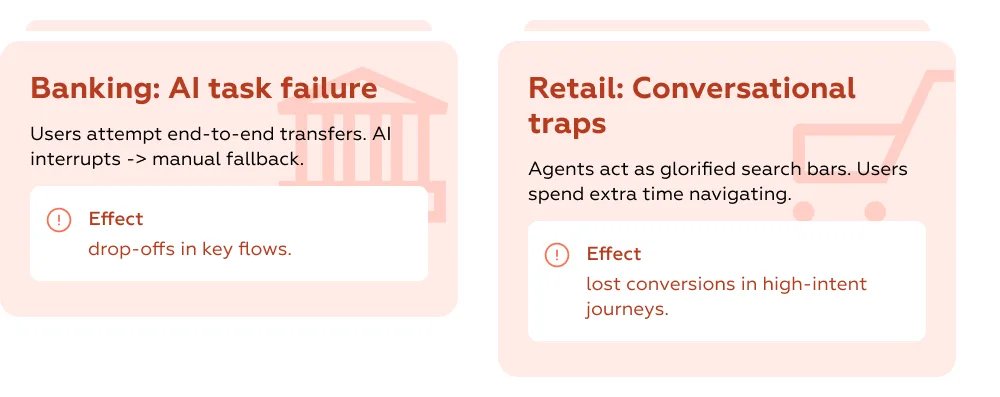
Across multiple studies, including insights from the UX Problem Guide, such misaligned implementations can cause up to 20–30% loss in task success or conversion rates in critical flows.
The problem is not the AI itself. It’s the absence of a coherent design model for autonomous systems. Screens, buttons, and flows alone are not enough — the system behaves differently than traditional interfaces, and design must account for that.
Enter Agentic UX.
Agentic UX is an approach where AI agents are active participants in achieving user goals, not just interface elements. It focuses on:
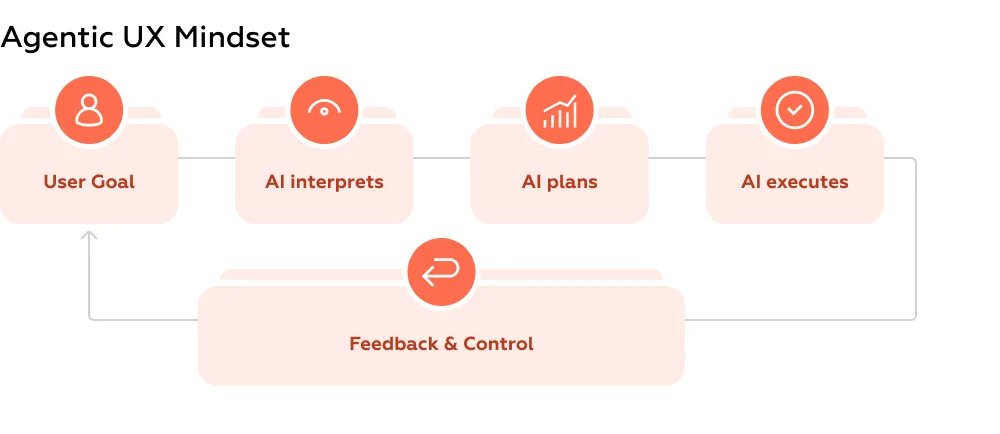
In this model, the interface is part of a broader decision-making environment, enabling human-AI collaboration. Screens are no longer just “UI”; they are decision layers that support goals, trust, and outcome visibility.
This article shares our perspective on Agentic UX — how it differs from traditional UX, the challenges it solves, and practical principles for designing AI-driven products that actually work.
Contents
AI agents aren’t just “smart widgets.” Unlike conventional interfaces, which expect explicit commands and predictable flows, AI agents act autonomously, interpret intent, and coordinate across systems. Treating them like a standard form, menu, or chat box misses the point — and often creates friction.
Here are the key differences:
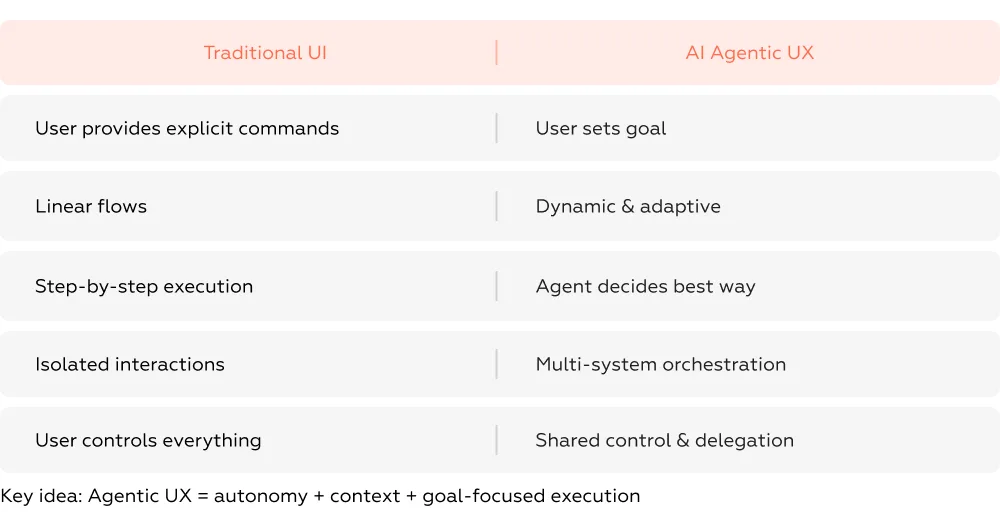
Traditional interfaces respond to precise inputs. AI agents, by contrast, decide how to achieve a goal, not just take orders. For example, in cloud system monitoring, a Supervisor Agent spawns specialized Worker Agents to analyze data, triage issues, and propose solutions — all without step-by-step user guidance.
Conventional UIs are linear and predictable: one task, one path. Agentic interfaces are dynamic and adaptive. Actions may happen asynchronously, across multiple agents, in non-linear sequences — like an ant colony coordinating to solve a problem. Attempts to shoehorn this into a fixed flow often backfire, creating extra steps rather than reducing effort.
Users don’t directly manipulate every element. Instead, they delegate tasks, provide feedback, and intervene only when necessary. In our studies, banks that implemented AI assistants as simple chatbots found users repeatedly explaining their intent, because the system had no autonomy boundaries. Result: slower flows, frustrated users, and 20–30% lower task completion rates in high-value scenarios.
In traditional interfaces, interactions are contained within a screen or a module. Agentic UX spans multiple subsystems, integrating APIs, data sources, and microservices. Poor design that layers AI over unchanged backends often produces “talking agents” that cannot complete tasks, leaving users stranded between conversational UI and manual flows.
Why this matters
Ignoring these distinctions is costly. Research shows that misaligned agentic interfaces can reduce efficiency, trust, and conversion by up to 40%. Mastering these differences — designing for autonomy, context, and goal-oriented execution — is the foundation of effective Agentic UX.
Designing for AI agents is not a matter of tweaking existing interfaces — it’s a whole different game. The challenges appear where autonomy, interpretation, and context intersect, and they are often invisible until the user gets frustrated.
Users rarely see the decisions AI agents make internally. They issue a command, and the outcome appears — but the “why” is missing.
Example: in cloud system monitoring, a Supervisor Agent spawns Worker Agents to investigate faults. The human only sees the summarized suggestions. Without visible reasoning, users can’t trust the agent’s output and hesitate to act on it.
Design insight: surface decision highlights, not raw data. Show what the agent considered and what it prioritized. Even small cues dramatically increase trust.
AI agents act semi-independently, but users often don’t know the boundaries. Too much action feels risky; too little feels pointless.
Case in point: some banks implemented AI chatbots using conventional conversational UIs. Users had to repeatedly clarify their intent because the agent lacked clear autonomy rules. The result? Slower flows and up to 30% drop in task completion.
Solution: clearly communicate when the agent will act, when it asks for confirmation, and how users can intervene.
Even when the agent acts, it may misinterpret user goals. AI agents rely on context and historical data; if either is incomplete, outcomes may be off.
Real-world pattern: iterative workflows like AWS Re:Invent’s CloudWatch investigation show users refining the agent’s hypotheses multiple times. This highlights the importance of designing progressive clarification loops rather than assuming one-shot accuracy.
Agent performance depends on remembering previous interactions, system state, and user preferences. Context loss leads to repeated input and inconsistent personalization.
Best practice: make context visible, editable, and persistent, allowing users to adjust assumptions without restarting the task.
These challenges underline a key truth: AI agents shift cognitive load from interface navigation to trust, understanding, and control. Ignoring them can reduce efficiency, satisfaction, and adoption by 20–40% in critical workflows.
On the surface, conversational UI and agentic interfaces may look similar — both often use natural language and feel “chat‑like.” But in reality these paradigms solve completely different user problems, and confusing them is one of the most common design traps teams fall into.
Here’s how they diverge — and why it matters for UX.
Conversational UI is built around interaction: you ask, the system responds. It lives in the space of clarifying questions, guided responses, and dialogue trees — often replacing menus and forms with text or voice. Think FAQs, simple support tasks, or discovery questions.
But that can lead to the hybrid trap: a common error where teams try to use chat as a replacement for traditional UI. Switch a user from a button to a text box mid‑task, and suddenly they must shift mental models — from clicking to phrasing. Users hesitate, second‑guess themselves, and the interface becomes a roadblock, not a shortcut.
A typical banking example: a user accustomed to tapping “Transfer” is suddenly prompted to type “Transfer $500 to savings.” Even if the AI is capable, this mode switch disrupts task flow and increases cognitive load.
Core emphasis:
✔ Guides and answers
✔ Clarifies user intent
✔ Supports exploration
UX goal: make dialogue predictable and helpful
Agentic interfaces take it a step further: conversation isn’t the end, it’s the beginning of task execution. It’s not about answering questions — it’s about doing work for the user. You provide a goal, and the agent plans, decides, and acts across systems.
This isn’t just a chat UI wrapped around automation. This is orchestration, where the agent executes multi‑step workflows: from draft to completion, seamlessly. For example, instead of just telling you how to schedule a meeting, an agent can pick times, invite participants, and book a room across calendars.
Core emphasis:
✔ Interprets user goals
✔ Coordinates across systems
✔ Executes actions autonomously
UX goal: deliver measurable outcomes, not just conversational clarity
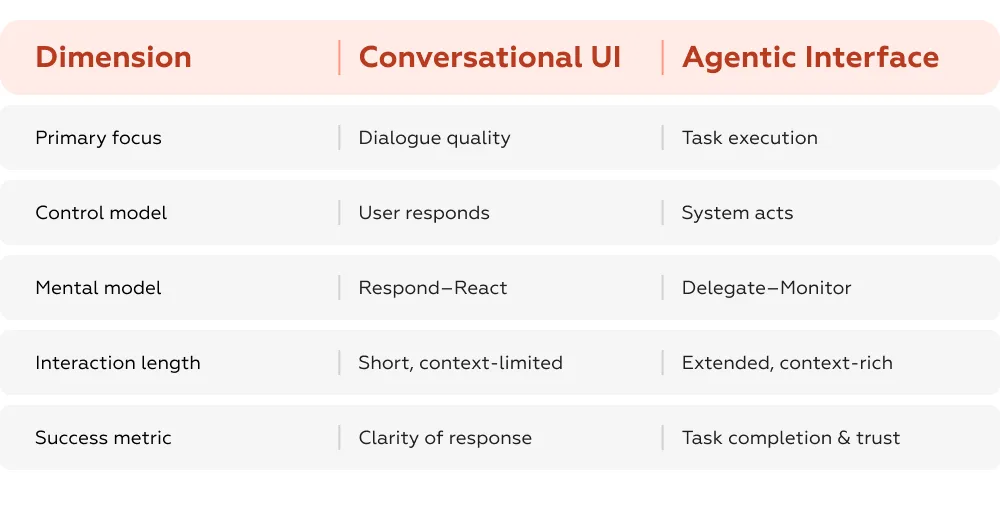
In research conducted across major enterprise flows, conversational UIs buried within broader journeys often fragment context, creating repetition and confusion. Users end up repeating intent, losing progress, or undoing agent suggestions — not because the AI wasn’t capable, but because the interface modalities weren’t orchestrated.
This mismatch — the so‑called hybrid trap — kills adoption. When chat and GUI fight for control, users are forced to choose which path to trust. This not only increases cognitive load, it directly lowers task success and confidence in the product.
Conversational UI is best when:
Agentic interfaces shine when:
Don’t treat conversation as a silver bullet. Conversational UI optimizes dialogue, not outcomes — and that’s fine, as long as it stays in its lane. For true autonomy and measurable value, agentic design needs clear orchestration, visible control boundaries, and outcome‑focused flows.
Getting this distinction right means the difference between:
Agentic UX is becoming a critical factor in AI product adoption. Designing strong agentic user experiences is not about sticking AI onto an existing UI. Designing effective agentic UX requires rethinking how AI agents interact with users, and building interfaces that support that partnership with clarity, trust, and control — based on both broader UX research and deep insights from our Markswebb practice.
Here’s how good agentic UX is built in practice, illustrated with real examples.
Instead of mapping every possible path a user might take, we design around what the user wants to achieve, then let the system decide the best way to get there.
Case: SMS-verification during new user registration (Open Talk)
Users struggled to understand what went wrong when a generic error appeared after SMS verification. By providing a clear error message with bold visual cues, explanatory text, and actionable guidance, Open Talk made the process transparent. Users trusted the system more and were able to continue registration without confusion or repeated attempts.
Visual: progress bar showing registration steps and where the error occurred.

Invisible reasoning is one of the top causes of mistrust. Users don’t just want results — they want to understand why the agent acted as it did and what steps are happening behind the scenes.
Case: Premium account upgrade (Deezer)
Users seeking to upgrade their account to a premium version encountered a major usability issue: none of the subscription-related elements were interactive or tappable. A small, barely visible note at the bottom of the banners indicated that upgrading in the app wasn’t possible, leaving users stuck and unsure how to proceed.
Solution: Deezer redesigned the interface by making premium banners fully tappable, enabling direct navigation to upgrade options. Users could now interact confidently with the premium offerings, understand available choices, and complete the upgrade seamlessly.
Visual: flow highlighting tappable premium banners and steps to confirm upgrade.
Autonomy works only if users feel they can intervene. Interfaces must allow pausing, editing, undoing, and approving actions.
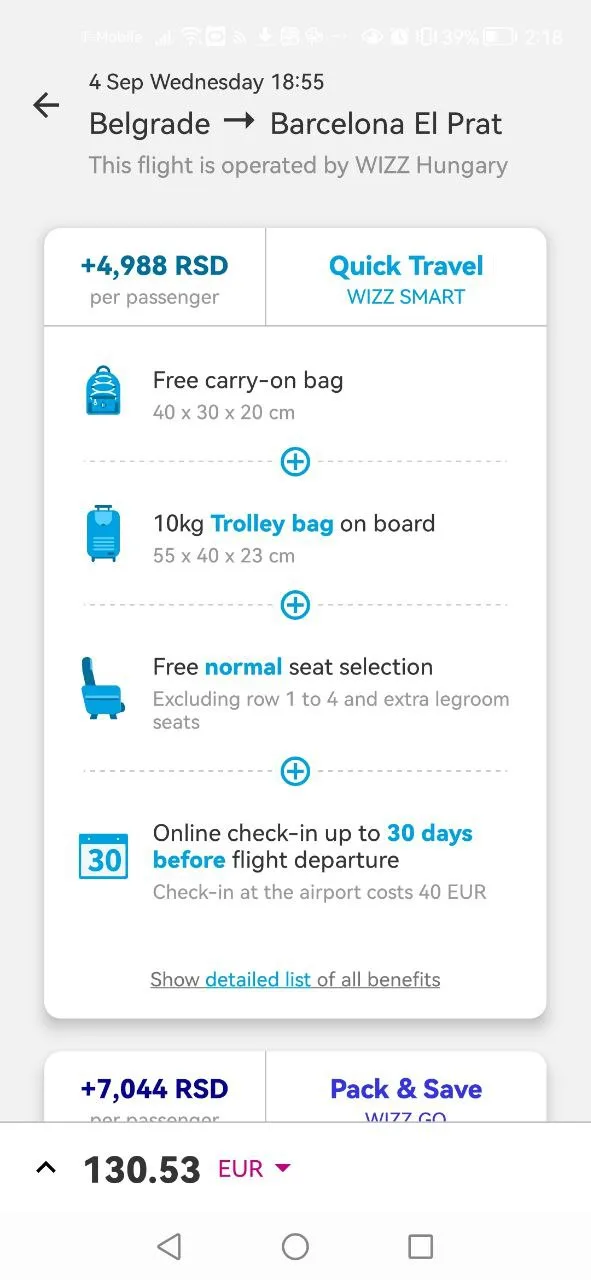
Case: Flight booking across currencies
Users booking a flight from Belgrade to Barcelona faced a usability issue: ticket prices were shown in the departure country’s currency (Serbian dinar). Even when users switched to their preferred currency (Euro), additional options like luggage still displayed in dinars, forcing users to manually calculate totals or check exchange rates elsewhere. This inconsistency caused confusion and slowed the booking process.
Solution: Trip.com allows users — even unregistered ones — to set a preferred currency, ensuring all prices, including optional extras, are displayed consistently. Users can now interact confidently, see total costs instantly in their chosen currency, and complete bookings without extra effort.
Visual: flight booking panel showing consistent currency across all options.
Avoid the “hybrid trap,” where conversational UI and agentic autonomy collide. Clear expectations, visible reasoning, and error‑forgiving designs earn user trust, especially when workflows are multi-step or cross multiple systems.
Even in a world of cutting-edge technology, the true battleground is experience design. Agentic UX is the first line where users meet your business intelligence. Get it right:
Because competition has become a bloody ocean, the winners are those who systematically integrate human-agent collaboration. Agentic UX is that first frontier — design it carefully, and you don’t just keep clients; you win them.
For guidance on implementing Agentic UX in your services, contact us via WhatsApp or email to discuss how we can help adapt these principles to your product.
What is Agentic UX?
Agentic UX is a design approach where AI agents actively interpret user intent and execute tasks autonomously while keeping users in control.
What is the difference between conversational UI and agentic UX?
Conversational UI focuses on dialogue, while agentic UX focuses on executing user goals across systems.
Why do AI agents fail adoption?
Most AI agents fail due to poor UX design — especially lack of transparency, unclear autonomy boundaries, and hybrid interfaces.
We respond to all messages as soon as possible.
We’ve evolved dozens of successful financial services and are eager to prove that our expertise can be implemented in other industries and around the world. Have a look at our success stories!